The reason I am using Altair for most of my visualization in Python
Sadly, in Python, we do not have a ggplot2.
Python’s go to visualization library, matplotlib, is very powerful1 but has severe limitations. At times its flexibility is a blessing, but it is easy to get frustrated adding a small feature to your graph. Also, matplotlib dual object oriented and state-based interface is confusing. I still don’t completely grasp it even though I have been using matplotlib for years. Lastly, it makes only static graphs.
Altair and the grammar of graphics
Enter Altair. Altair is a wrapper for Vega-Lite, a JavaScript high-level visualization library. One of Vega-Lite2 most important features is that its API is based in the grammar of graphics.
Grammar of graphics may sound like an abstract feature, but it is the main difference between Altair and other Python visualization libraries. Altair matches the way we reason about visualizing data.
Altair only needs three main parameters:
- Marks. Do you want the data represented by points? lines? bars? circles?
- Channels. Which variable should be mapped to the x-axis? to the y-axis? to the color of the mark? to the size of the mark?
- Encoding. Is the variable a date? a number? a category?
Based on these Altair will pick sensible defaults to display your data.
My favorite example of Altair’s sensibility is how it chooses colors. If you tell Altair to color a quantitative variable then it will use a continuous color scale (light blue, blue, dark blue). If you tell Altair to color a categorical variable3 then it will use a different color for each category (red, yellow, blue).
Let’s see a concrete example:
I made up 6 countries and population numbers. The data looks like this:
import pandas as pd
import altair as alt

data = pd.DataFrame({'country_id': [1, 2, 3, 4, 5, 6],
                     'population': [1, 100, 200, 300, 400, 500],
                     'income':     [1000, 50, 200, 300, 200, 150]})
| country_id | population | income |
|---|---|---|
| 1 | 1 | 1000 |
| 2 | 100 | 50 |
| 3 | 200 | 200 |
| 4 | 300 | 300 |
| 5 | 400 | 200 |
| 6 | 500 | 150 |
We will first plot the population data for each country:
"""As we mentioned before, we need to define 3 parameters:
 1. Mark: We do this by using "mark_circle".
 2. Channel: We only define an x-axis and we map it to the population.
 3. Encodings: We define both variables as quantitative by using :Q after the column name"""

categorical_chart = alt.Chart(data).mark_circle(size=200).encode(
                        x='population:Q',
                        color='country_id:Q')
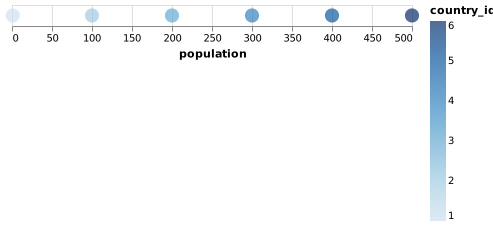
Altair picked a continuous color scale. That doesn’t make sense! The problem is that we defined the country_id as a quantitative variable, but it is really a categorical one.
# We changed color='country_id:Q' to color='country_id:N' to indicate it is a nominal variable
categorical_chart = alt.Chart(data).mark_circle(size=200).encode(
                        x='population:Q',
                        color='country_id:N')
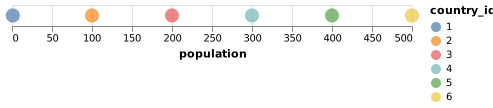
We only changed the encoding of the variable country_id. Instead of using Q (Quantitative) we use N (Nominal). That’s enough for Altair to know that it shouldn’t use a continuous color scale.
Extending you graphs
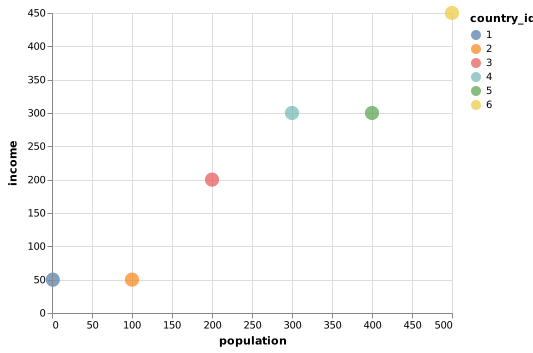
Another beauty of Altair than usually you easily build-up from an existing graph. For example, let’s say that now we want to add income to our graph. We simply tell Altair to map the y-axis to income:
categorical_chart = alt.Chart(data).mark_circle(size=200).encode(
                        x='population:Q',
                        y='income:Q',
                        color='country_id:N')
Want to add tooltips? One line is all you need:
categorical_chart = alt.Chart(data).mark_circle(size=200).encode(
                        x='population:Q',
                        y='income:Q',
                        color='country_id:N',
                        tooltip=['country_id', 'population', 'income'])
Is that all?
At first, I was skeptical of using a wrapper of another library as my main visualization tool. Wrappers are often a bad idea. For example, there are many wrappers for ggplot2 that haven’t been widely adopted by the Python community. It is hard to create one that is feature complete and up to date. But Altair is different:
Altair’s API is comprehensive. Thanks to Jake Vanderplas (JVP) great design everything you can do in Vega-Lite you can do it in Python. Altair is simply a Python API for generating valid Vega-Lite jsons. The beauty is that the API is programmatically generated, allowing Altair to be comprehensive and quickly updated after Vega-Lite new releases.
Intuitive and pythonic interface. Like every library, it takes some time to get used to. But what’s brilliant about Altair is that everything is set up to match the way we reason. It just makes sense. You will quickly understand its inner workings and become increasingly more productive.
Interactivity. Vega-Lite interactivity is very powerful. You can add tooltips with one line of code. You can link the selection of a graph with another visualization.
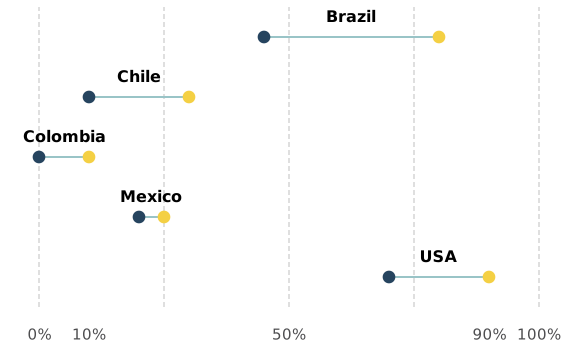
- Flexibility. Altair marks can be thought of as building blocks. For example, I made the graph below (the example has fake data) using a combination of circle marks, line marks, and text marks. The code ends up being readable and easy to modify, something that would be hard to say for a similar implementation in matplotlib.
Altair main disadvantages
No 3d plotting. If 3d visualizations are important for your day-to-day, Altair is not the right tool for you.
Altair is no D3.js. Like many high-level visualization frameworks, Altair it is not 100% customizable and at some point you will find a chart you can’t do with it.
Not great statistical support. I still rely on Seaborn for quick visualization that needs to fit a linear regressions
If this got you excited (or at least curious) I highly recommend Altair’s documentation. It is a concise and clear place to start. Don’t forget to check out the example gallery and the details of Altair internals.
matplotlib recently came into the spotlight again for being attributed the first black hole image. ↩︎
In the rest of the article, I will mainly refer to Altair, but Vega-Lite deserves as much (or more) credit. ↩︎
Vega-Lite has two types of categorical data: nominal and ordinal. Nominal are categories where the order doesn’t have meaning. For example, the continents which are Europe, Asia, Africa, America, and Oceania (for me America is a continent, not the USA). Ordinal are categories where the order has meaning. For example, an Amazon review can be one, two, three, four or five stars. ↩︎